Showing posts with label Large Events. Show all posts

Thursday, February 14, 2013

When is a little competition TOO much competition?

When your audience is really getting into your game show, that's generally a good thing. The teams are cohesive and working together, the adrenaline is flowing, emotion is high...but sometimes things get a bit, well, out of control.

We were recently hosting a game show event and coaching the game show host on how to get the teams pumped up. There are several ways to do this:

1. Get teams cheering (call out teams/team names and ask them if they're ready to play/if they're going to win)

2. Recap scores

3. Reveal prizes

4. Raise the stakes

But when we started playing the game show, we found that our worries about getting the audience into the game were completely unfounded. The audience was coming off 7 hours of training and content, and they were *ready* to compete and ready to play. (It didn't hurt that they were sales people and competitive by nature.) It was a little overwhelming. Our concern about getting them cheering quickly turned into concern for our neighboring rooms.

So when things get a little too rowdy, what can you do? Here are some tips:

1. Slow down the game play. Take a moment to get to know the team captains.

2. Ask more involved questions. Go outside multiple-choice/rapid-fire questions and get into a meatier open-ended question scenario.

3. Keep prizes small. We find that keeping prizes small doesn't usually mitigate the enthusiasm, but it does keep the competition from getting nasty.

4. Turn down the volume. Sometimes just asking for half-volume can keep the energy up while keeping the disruption down.

Wednesday, September 5, 2012

How to transition a classroom game into a larger event.

Many trainers use Gameshow Pro in their classrooms; in small-to-medium sized groups in a somewhat-intimate atmosphere. The energy it brings to the smaller training class is undeniable; it increases engagement, participation and content retention.

But can the small classroom solution translate into something like, say, a larger event? Sure a game show is fun in training a small group of sales reps, but what about in a room of 500? Will it even work? How does one even begin transitioning from a classroom game into a larger event game?

The answers are: Yes, game shows translate into large events. Yes, they invigorate a large group in the same way they add energy and interaction in a small group. Yes, it has worked time and time again.

And here are a few strategies and considerations for transitioning a classroom game into a game within a larger event:

Team selection: Whereas everyone in a small class may get to directly participate on a team, that's not always possible in a larger group. There are three options for team engagement in a big-group game show:
  1. Use audience-response keypads: If enough are available, giving everyone in the audience an audience response keypad is the most straightforward way of engaging everyone. Audience members can individually play along, but Gameshow Pro also allows you to group individuals on teams--creating a compelling, competitive dynamic. No "stage teams" are needed in this scenario.
  2. Use a mix of keypads and on-stage players: You may also want to have representative team members playing on stage to "ham it up" or to take the audience response into consideration for their answers.
  3. Use representative players on stage: Even if you have no keypads, you can engage and entertain everyone by selecting members of the audience to come play on a smaller team onstage. The rest of the audience members are still "part of" the team--they're responsible for cheering the team on and may reap some rewards if their team wins--but they don't have to directly interact with the game on stage. 
Host selection: While a small classroom game can be a scalable event--from a quiet Tic-Tac-Toe game to a rousing Classroom Feud--with a large event, bigger and broader is better. You'll want to make sure that your host is able to play to the crowd as well as team members, educate when needed, and to keep things moving. This doesn't need to be a professional emcee, but it should be someone who enjoys the spotlight and is very comfortable on stage--where anything can happen.

Simplify the rules: In a classroom you may have a chance to answer clarifying questions about the game rules as you go along. In a larger group this may not be possible, or it may be harder to control chaos from unclear rules as you go along. Make sure your game show rules are simple, clear and that everyone knows them. Playing a sample game question to get audience members familiar with the format, keypads and game logistics is a great idea.

Have someone else run the game: It's easy to click-through a game show (especially using Game Show Pro) and host at the same time in a smaller classroom. In a larger event setting, you'll want your computer hooked in to the A/V equipment and that may preclude you from controlling the game. Even if you do have access to the game controls, hosting and running through the game on stage in a large setting takes a lot more energy and focus than you'll want to spend. Get a colleague or technician to run the game software for you if you can.

Format selection: You may want to switch out a traditionally formatted game for alternate game play when bringing it on the big stage. For instance, we often make Tic-Tac-Toe into a Hollywood-Squares-Type game, utilizing different experts and presenters throughout the game.

When in doubt? Call in the experts. We'd be happy to help you transition your classroom game into a larger event.

Wednesday, February 15, 2012

Together or Apart: A lesson in team placement.

Dan (the owner and founder of LearningWare) and I have been in disagreement on one game show issue for a very long time. Despite our respective expertise, we've never seen quite eye to eye on this issue.

Do you seat teams together in a competitive game show environment, or do you spread a team throughout the room?

Dan would always advocate for the latter. From dealing with hyper-competitive sales reps, he had seen many, many instances where teams had cheated when sitting together. (For instance, if they all had keypads, one person--who knew that particular question--would hold up a letter and everyone would press that letter on their keypad.) When teams were sitting scattered throughout the room, there was no advantage for them to do this since the other team would also benefit from their assistance.

I always loved the energy that a team would generate sitting in the same space. I loved watching the cheers as the point tallies would rise in an AllPlay game. I loved watching the discussion and collaboration. Could they cheat? Maybe--but they didn't always. And the point of the game was to review information and add energy to a training session--even if they were told the answers, everyone still was reviewing the information one more time. Cheating can backfire as well--what if that one person everyone is trusting to give the answer has it wrong? The team gets a zero-score instead of at least *something*.

Who is right? Well, both of us. Ultimately both ways work. If a trainer is looking to really test everyone's individual knowledge--having a team seated apart is a better gauge of this metric. If a trainer is looking to review information and increase the energy in the room exponentially--then having the teams sitting together makes for a great game show.

And I'm happy to admit that after recently running several game shows at large events--both ways--Dan is starting to come around to my way of thinking.

Monday, October 24, 2011

Custom Game Show: A Fistful of Dollars


Company: Toyota (Financial Division)
Event: Sales Team Reward Breakfast
Custom Audience-Response Game: A Fistful of Dollars – Three different game plays
Graphics, Programming, Scripting and Game-play: Designed by LearningWare

Situation: Toyota wanted a way to engage and entertain their top sales reps while at the same time testing their company knowledge and giving them the opportunity to earn some big rewards with that knowledge.  This was a great teambuilding event in the morning; it gave the audience a chance to compete on teams and individually and allowed them important, low-stress face-time with top executives.

Toyota had already used a game show the previous two years—both times utilizing either LearningWare software (Gameshow Pro) or custom software programmed for their event by LearningWare. They wanted something to fit their Clint Eastwood “Western” theme and that would add variety from previous years’ play.

Solution: A custom Fistful of Dollars game show with three completely unique varieties of game play. The audience still played along using audience-response keypads, but there were a few variations:

Target Practice: In this game play variation, we asked extremely difficult multiple choice questions. The audience members, consequently, had three opportunities to get a question right.

The question was be asked the first time, and the audience saw what percentage of their team responded correctly. They did not know whether they—individually—answered correctly. They then got a chance to answer again—and they could either change their answer or stick with it. Again, the percentage of correct answers was be shown. They got one final chance to answer the question, and only their third response counted as correct or incorrect.


Do You Feel Lucky Punk?: (Wager Round) In this game variation, we utilized a team leader—someone with guts, daring, and willingness to take the glory or the fall.

Everyone on the team was shown a question. Before the audience votes, the team leader decided whether he/she thinks that 75% of the team will know the answer or not. If he/she is confident, then they’ll bet high. If not, they’ll bet low.

No guts, no glory. The team leader wrote down or verbally submitted their wager. The question then played out as a typical audience-response question.


Six-Shooter: (Speed Round/Final Round) Teams were asked a group of 6 questions—rapid-fire-style. They were NOT  shown the team results of their answers until after the questions are done, at which point the team scores rose (and failed to rise as much as they should) dramatically, determining the final winner.

Results: The game show was entertaining, challenging, tough, competitive and held a level of novelty—being different than the year before. The audience was engaged with each other and management for the entire morning.

Wednesday, August 17, 2011

Introducing: LearningWare Services


Introducing the launch of LearningWare Services! 

Why Utilize LearningWare Services?

Using games can improve your training immensely. Compatible with any type of training, they turn a potentially boring, dull or stagnant classroom experience into an engaging, fun and highly interactive session. 

When we entered the game show software market with our pioneering product-- Gameshow Pro--we knew that it would make learning more fun. But it surprised us to find that it also made learning more effective. We received reports from trainers that engagement and motivation were soaring, test scores zooming UP, etc. Since then, independent academic research has also confirmed that using game shows in a learning session can dramatically improve content retention and comprehension.

We now have over 15 years of game show experience, and have learned how to maximize the effects of games in the training classroom to completely engage every student. We even published a book—“I’ll Take Learning for 500; Using Game Shows to Engage, Motivate and Train”—on the subject, and have spoken as trusted experts on game shows in training at several training conferences and company events.

Bottom line? We want you to get the most out of using game shows in your training, whether it be:
            Compliance
            New Product Introductions
            Orientations
            Sales Training
            Webinars
            Safety
            HIPPA/OSHA/Etc.
            Audience engagement
            Academic classes (K-12 or Collegiate level)
            Or any other training session

Consulting Services:
We'll help you integrate games into training to maximize engagement and retention. We'll consult with you to understand your training objectives and put you on a course to successfully implement games. We'll show you:
            - Where to implement games
            - How to put them into practice smoothly (including hosting training, etc.)
            - What games to use and when
- How to design your game, develop your questions, set up your session, etc.

We’ve consulted with dozens of clients on game show utilization including: Procter & Gamble (Marketing University), Johnson & Johnson, Mystic Tan, Intel, Toyota, Lawson Software, Transamerica, Onyx Pharmaceuticals, Comcast, etc.


Custom Game Development:
We'll develop a classroom or web-based games that is perfect for you. This can include large-scale audience response games, branded games with custom graphics, unique game play formats, etc. Our in-house programmers work with you to make a game show solution that will revolutionize your training or event, and looks like nothing else out there.


Train-the-Trainer Workshops
We want your game show roll-out to be smooth and successful. We offer train-the-trainer workshops to ensure that everyone in your organization is up to speed on game show implementation for their training sessions. These workshops are highly interactive, and will teach:
-       The where-when-how of using game shows in training
-       Question creation best practices
-       Setting up the rules and games in your software
-       Choosing the best game for your content
-       Hosting best practices and tips

Depending on your need and workshop format, experts will be on hand to walk each attendee through creating their first games; this means that everyone will leave the session absolutely primed for a successful first game show experience.

Large Scale events
We’ll work with you to produce a game show at your next tradeshow, conference or workshop that will engage your entire audience.

Our production ranges from on-site implementation of existing game shows, to custom game design using audience-response systems, and everything in between.

Game shows can be used in a large event as:
-       Main-stage entertainment
-       A teambuilding activity
-       A competition throughout the event
-       A unique presentation sure to be remembered
-       A review tool after key presentations
-       An evening activity
-       A featured trade show attraction
-       A tool to make workshops/breakouts incredibly engaging

We’ll consult with you to make sure your game design is flawless and be onsite to ensure that it is executed perfectly.

Thursday, February 17, 2011

Hey! Keep it Down in There!

We recently helped a client Gameshow Pro 5 in their educational workshop.

This session was part of a multi-day event, and attendees could sign up for any session that they so chose. Groups would rotate after a set amount of time--giving attendees the opportunity to be in more than one session and making the presenters give multiple presentations with the same content.

When our client came to us, they were concerned about the interest level of their content. This was a sales group we were dealing with, and they had heard all about the new customer management system (the topic of their workshop), but they weren't adopting the technology as the sales leaders had hoped. So how were they going to generate excitement around not-new information?

With a game show, of course*!

The workshop ended up being structured like so (game show sections in italics):

Welcome
Introductory game questions (2 questions using Gameshow Pro 5's AllPlay game)
Subject: Account Planning
Review game: Account Planning (5 questions: GSP5 AllPlay)
Subject: Customer Management System
Review game: CMS (5 questions: GSP5 AllPlay)
Summary, additional info and questions
Review game: Both topics (6 questions: GSP5 Classroom Feud)
Closing words

We divided the audience of 60 into two teams--based on the complex criteria of being either on the left or right side of the room. For the AllPlay games, every member of the audience had their own keypad and entered answers individually--the percentage of correct answers going toward their team's score. For the Classroom Feud game, we took several volunteers from each side to come up and play for their team (while the audience cheered them on).

The entire session ended up being about 90 minutes--with games interspersed to keep the energy high.

And boy, was the energy ever high! Aside from a marked increase in attention to the content (just in case anything came up in a game), and retention of the content (as seen in tracking their individual responses) there were two stand-out results:

1. Since the workshop breakout rooms were beside each other at the hotel, you could hear the game being played in other classes. Not the game sound effects, mind, but the cheering, encouragement and general good time. One of the other leaders--jokingly--asked the facilitators to "Keep it down in there!"

2. As a result of the energy spilling out of the room, spontaneous attendance to the workshops increased dramatically. The client had people come up and say, "I know I wasn't signed up for your class, but do you have room for one more..." People *wanted* to come in and play, because it sounded like there was life and energy in the session. It attracted quite the crowd, and as a result MORE people received and retained the information than would have otherwise.

The game shows were a great success. Both the presenters and the audience had a tremendous amount of fun--but it wasn't fun without a purpose. Most importantly: the audience walked away with the message.


*Disclaimer: Game shows may not be the answer to everything... just most things. ;)

Monday, August 16, 2010

Custom! Custom! Custom!

Wow! Whoever coined the term "lazy summer" sure wasn't talking about us over here at LearningWare.

You may have noticed that our blog and Facebook page has been updated a little sporadically over August so far, and there's a reason for that: We've been on the road--creating and producing custom audience-response game shows!

If you're following this blog, you're (probably) already familiar with our Gameshow Pro classroom game show solution, as well as our webinar solution (AllPlay Web), assessment solution (AllPlay) and our online solution (QuizPoint). What makes the custom game shows different from our off-the-shelf software listed is that they're completely redesigned from the ground-up with custom graphics, programming, game play, etc.

Here are just a few of our summer highlights:

"The Fairway 2 Heaven"
Toyota
[Image seen above]

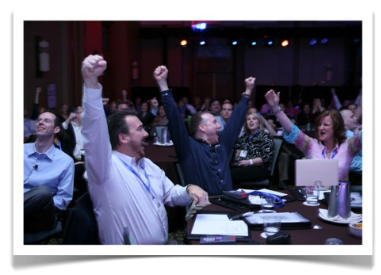
We traveled to Pebble Beach, CA to produce the "Fairway 2 Heaven"--a themed game show event that took place during their Circle of Excellence. The game had custom golf-themed graphics (appropriate for Pebble Beach) and included audience response pads. However, the audience didn't just play along on teams. At different points, we "highlighted" audience member keypads for high-stakes play. The game was also programmed so that audience members could "wager" on whether they thought their colleagues would answer a question correctly--or not.

"The PulteGroup Smackdown!"
PulteGroup

To reinforce information over a 3-day event, we programmed "The PulteGroup Smackdown". Audience members were divided into six teams that stayed together throughout the three days, and competed in progressively building challenges. The Smackdown highlighted and reviewed key content; from one day to the next it became the "Planning Smackdown" or the "Coaching Smackdown" or the "Sales Process Smackdown"

The picture shown was taken by an audience member--illustrating their keypad (coded by team color) and the opening game screen in the background.

"The Deep Dive"
EBMS
[Not shown]

A mixture of polling and competition, all in the same game! The "Deep Dive" for EBMS featured graphics that matched their oceanic deep-dive theme, and focused on gathering information and reinforcing knowledge. Since the audience was made up of clients, EBMS wanted to more deeply investigate the needs and behaviors of the audience as well as engage them and energize them with a game show. With custom programming, we were able to securely assign keypads and track data, seamlessly ask polling questions, and also switch to team competition that brought down the house.

Tuesday, March 23, 2010

AllPlay at an Event: The Experient Experience.

Imagine taking the classroom audience response experience of an AllPlay game show--every single person playing along, engaged and motivated--and expanding it to a large event audience of ~250.

That's exactly what happened in the Experient event. With the cooperation of our sister company, Live Spark, we produced a customized AllPlay audience response game show that kept everyone in the audience involved, kept the energy in the event high, and reinforced crucial content.


THE CSI SMACKDOWN
The theme of the event was "CSI: Customer Strategy Investigation". The goal was to train the audience (all functionaries within the meeting industry) to be more strategic with their clients. The audience was given a case study before the event--but the key players were unsure whether they would read it and how much they would take away from it. In addition to the case study information, attendees also had to gather "clues" throughout the event. At the end of the event, teams had to present solutions to the case study utilizing the information and clues.

OBJECTIVES:
The "CSI Smackdown"--a customized AllPlay audience-response game show--was developed to:
  • Reinforce key case study information.
  • Reinforce and point out clues.
  • Supplement a few key presentation points from the keynote speaker.
  • Energize the audience in between sometimes-dry presentations.
  • Give everyone equal footing going into the case study presentation.
  • Be part of the bigger team challenge throughout the event (game show points for each team were added into their case study scores).
  • Keep the audience on-the-lookout for clues (lest they miss any points in the game show!).
GAME PLAY: The audience was divided into four teams. Each member of each team had a keypad--and the percentage of correct responses taken from each person on the team went their team's total score.

The CSI Smackdown was played throughout the four day event in rounds of 2-4 questions each. This was just enough of a "touch" to reinforce information and energize the room without making the event too much about the game show.

Scores accumulated over 4 days, but the second day, points were doubled. The third--tripled, and the fourth--quadrupled. This was so that--in theory--any team had the chance to leap ahead of the pack with a well-played question. This meant that all teams maintained a stake in the game--whether they were the top scoring team, or the bottom of the bunch.

THE RESULTS: Cheering. Energy. Excitement. Buzz about the game show. A little bit of smack-talking.

After each question, the teams saw the right answer, and were taken to a scoring screen. Four columns--one representing each of the teams--started to rise in suspense in accordance with the teams' scores. (Chants of "Go Team X" or "Go Team Y" were heard.) The column of the lowest scoring team would stop. . . then the next. . . then the next. . . and then the room erupted into cheers, high-fives, and a burst of energy as the highest scoring team was revealed. It's amazing the amount of rejoicing takes place after each question. There's nothing like it at an event.

Most importantly--at the end of the game show, teams had a better understanding of the content than when they began. Everyone was on equal footing so they could present their final case studies, and everyone had a heck of a lot of fun.

As seen in this picture below. After all...does that look like a typical corporate event to you?

Wednesday, October 7, 2009

The Game Show Effect

The Game Show Effect

The remarkable way that game shows transform an event.

I, personally, am a little surprised every time a client is blown away by the effect of a game show on their event. Not that game shows aren’t amazing—it’s just that I’ve seen maybe hundreds of game shows at live events, and they’re consistently, predictably amazing. I suppose I’m a bit used to it.

Our client came up to me at the last show and said with awe and wonder,
“I cannot believe what a difference the game show made—it was like every time we introduced a round the energy in the room just shifted. All of a sudden they were all up and awake and looking at the screen and their keypads and whispering….”


I smiled and nodded knowingly and in agreement—because that kind of experience is what happens every single time we bring a game show into a live event.

The Barnyard Bowl: An AllPlay Case Study.


The aforementioned comment was made by an executive at Kemps—a nation-wide producer of all kinds of dairy products. Live Spark—our sister company—had designed the one-day event to have a game show running throughout the day.

They took our AllPlay software, and customized the screens, logos, timers, etc., to give it a totally unique and custom look for Kemps—but the base premise of the software remained the same: everyone in the audience had their own keypad to answer the questions in the game show.


They were broken into teams—It’s Local, It’s Fresh and It’s the Cows (put together, all three teams form the Kemps slogan)—by the colors on their randomly-distributed keypads.


When a question and answer options were displayed on the screen, everyone input their answer on their keypads, and the percentage of correct answers was then added to the team score. This was displayed as an empty glass filling with one of Kemps’ major products: milk.


Each team had from the time the custom cow-timer at the bottom of screen started until she reached the barn to lock in their answers.


We played 4 complete rounds of three questions each. The first two rounds, the percentage of people that answered a question correctly on the team was added to the team score.
In round 3, points doubled.
In round 4, they tripled—so that even a team who was behind had a chance to catch up till the very end.

The game show ran throughout the day, and incorporated questions from the previous presentations.

The effect of the Barnyard Bowl was immediately and consistently visible. Each time a round was announced, the audience would sit up in their chairs; bodies leaning forward, reaching for their keypads and murmuring amongst themselves. It was like pressing a “refresh” button for the room, recharging everyone’s batteries after occasionally-dry presentations. After a question, the right answer would be revealed—inspiring cheers and discussion. Then, when the scoreboard came up and the glasses started to “fill” with the percentage of right answers, teams would cheer. Then one glass would stop and the others would go on, causing the cheers to get louder. Then the other glass would stop, revealing the top-scoring team for that question, and the room would erupt in cheering and clapping.

Rounds were played sometimes before and sometimes after lunch and/or breaks, reinforcing information and preparing the audience for content to come. But the greatest thing was walking out to a break after playing a round and hearing the halls a-buzz with game show talk. Audience members were talking about their teams, the questions they had just answered, and the content within the game show (and related presentation content). This means that the presentation material wasn’t just left in the room and consequently forgotten—in addition to energizing the audience and being a heck of a lot of fun, the game show was also reinforcing information and improving content retention.

At the end of the day, after the last round and as people were leaving, comments were flowing:

“That was a lot of fun!”
“I loved the game show!”
“I hope we do that next year, too.”
“We should do that in our normal meetings.”
“I’m glad we had a game!”

The thing is--we hear this each and *every* time we use a game show in a large event like this--whether it's a simple Jeopardy!-style Gameshow Pro game, or a customized AllPlay game.

The client came up to me after the event,
“The game show was a huge hit!”

And that speaks for itself.

Monday, February 23, 2009

Custom Game Shows: The Seagate Case Study

LearningWare is pleased to be not just the provider of game show software, but also of solutions. LearningWare can create interactive solutions (with game shows or not) for your training session, curriculum or event through our LearningWare Services division (in partnership with its sister company, Live Spark). What follows is one example of LearningWare creating a custom game show to suit the needs of the trainer.
Summary: Seagate needed a way to engage their audience in traditionally dry breakout sessions. Live Spark created three different custom audience-response game shows that were played in each of the three breakout sessions throughout the session. The games were not only well received, but the audiences’ attention and retention of the material soared; as did the energy of both the presenters AND the attendees.

Overview: Seagate was getting all their local and international sales reps together for a large annual event. Part of this event included 90-minute workshops training on everything from product roadmaps, to new product introductions and sales strategies. Audience members cycled through the four major workshops in regional groups; from the Americas, to Europe, to Asia to Canada.

Issues: The extended workshop sessions were trying on the attention span of the attendees. A large amount of very important information needed to be presented, so presenters were scheduled back-to-back, giving attendees very little time to process and absorb the information. This was not conducive to learning.

Pile on top of that the fact that a lot of the material was very technical and could be dry. It was a recipe for attendees to check out of the breakout and check their Blackberries instead.

Solution: Live Spark designed three unique audience-response game shows that took place throughout three of the breakout sessions. They were a baseball-themed game, a quick-quiz game, and a “Get Smart” game.

Each audience member had a keypad waiting for them when they walked in the door. Depending on the game type, audience members were either playing individually (with the score of the highest keypads winning the game) or on teams. The games were introduced first thing, and a sample question was played.

After every presenter, a game show session took place. The content for the game show was based on the presentation the attendees had just heard—with the exception of the final round at the end of the workshop; which was a compendium of questions.

Why it worked: When the first question of the first round was played, and the audience found out how they scored in a dramatic, building fashion, the room erupted into cheers—led by the team with the highest score on that question. The energy, instead of draining with each progressive speaker, was refreshed and renewed in between every presentation. Not only that, but speakers highlighted the content that was going to be in the game show later—bringing out key points that were reinforced through the highly emotional game show experience.

Everyone in the audience was engaged. They were engaged during the game show--each playing along with their own keypad—but, perhaps more importantly, they were engaged DURING the speaker presentations. No one, after all, wanted to miss a question in the game show because they failed to hear a fact or key point during the presentation.

Because game shows are a somewhat-universal medium, there was no difficulty getting even international groups to play along.

Reactions: Seagate--the speakers, audience members, and organizers—were extremely happy with the game show.

”I didn’t believe you when you said they’d start cheering with the first score,” an event organizer remarked, “But this is simply amazing. Everyone is engaged.”


Audience members, knowing the next workshop was going to contain a game of some sort, were a-buzz in the hallways, talking with their peers about which session they had just come from; what game they played, who won, and which questions stumped them.

It was the most widely successful breakout session event that Seagate had ever had, and we’re happy to report that there was a distinct lack of Blackberry-checking.

Tuesday, February 10, 2009

5 Ways to Use Game Shows Outside Your Training Classroom

Game shows are effective training tools inside your classroom, but they’re also extremely versatile. We’re always amazed at the new ways trainers find to use Gameshow Pro (and other game show products) in their businesses—and even their daily lives. Game shows aren’t just for entertainment anymore—but they’re also not JUST for training in the classroom!

1. Large Events
Game shows are a wonderful, “show stopping” element in a large event (like a large annual sales or training meeting). Use a game show after keynote speakers/presenters to both perk-up the audience and cement the presentation content in their heads, preparing them for what they’ll hear next. We’ve done large events where we’ve had a game show running throughout the day (or multiple days). The element of competition keeps audience members engaged, and being divided into teams to play the game show prevents them from getting lost in a sea of attendees. Game shows are also fantastic as a stand-alone element within a presentation or as part of a breakout session.

2. On the Web
If you frequent our site, you’ll notice our webinars. We use game shows in webinars to keep attendees engaged and to review webinar content. (In fact, if you’d like to see an example of game shows being used in this way, sign up for a webinar!) If your company does online training, using a game show over the web can have the same positive effect as using a game show in your training classroom—engaging all participants, increasing content retention, and motivating trainees to pay attention to the rest of the training. Game shows can also be used in a sales webinar for your company’s product to review benefits and features or to recap the sales presentation in a unique and inventive way that your customers are sure to remember.

3. Co-worker Gatherings
We’ve had customers send us their stories about using game shows for everything from annual corporate retreats and company holiday parties, to employee orientations and fundraisers. Game shows can be an opportunity to let your company shine by incorporating company information into a just-for-fun game show. Your employees learn more about the company and get to network and interact with their peers all in a low-pressure game show environment. A game show is the hit of a party, and it’s a fast and easy way to create an entertaining event.

4. Sales Presentations
Put a game show in your sales personnel’s toolkit and they’re ready to sell in a way that is unlike anything else your customers will have seen. You can do a little bit of research on a client and create a game show around their company to break the ice. You can also use a Classroom Feud-type game to create curiosity and a sense of need around your product. For example, if you were selling printers, you could have customers answer the question: “What are the top 5 complaints that most companies have with their printing service?” This can lead into a benefits-selling strategy for your salesperson based on how the clients have answered the question.

5. Family Events
As long as you’re already familiar with game shows, you can take them outside the corporate world and into your family events (including reunions, weddings, baby showers, etc.). For instance, a colleague of ours was getting married. He wanted a unique way to engage guests at his wedding reception so they would have fun and learn more about the happy couple. In each invitation to the wedding, he and his bride-to-be included a survey with questions like: Where do most couples meet, how long are couples together before they get married, etc. They compiled all the responses they received and put them into a Classroom Feud game show. Guests had to guess the top answers from all the questions. At the reception the bride’s family was pitted against the groom’s family, and the game show was played without a hitch and with only minimal cheating on the groom’s side.

Bonus Use: Almost anything.
You’ll find that when you start using game shows, you’ll love them so much that you’ll be able to find uses for them anywhere. We had one trainer who had his class build game shows to sharpen their computer skills (importing and exporting graphics, files, pictures, sounds, etc.). At the end of the course, they had a game show that they could use in their OWN training class with their own content. You can also have your trainees build games to use with the other trainees in the same class—further emphasizing the training content.

Thursday, January 29, 2009

Game Shows in a Large Group: The Prudential Relocation Services Case Study

Prudential Relocation Services recently hired a production company—Live Spark—to produce a game show for their national event. They used LearningWare’s Gameshow Pro software with great results. Here is what they did to make their game show a success in a large group.

Company: Prudential Relocation Services
Audience Size: 250

Game Show: Gameshow Pro’s Classroom Feud

Game Setup

The audience of 250 people was divided down the middle. One half of the room would be on a team, and the other half on the opposing team. Five game show contestants for each team were pre-selected to come and play up front. An engaging game show host led the teams through the rules and game play; teams had a face-off question to determine which team would get to answer the question, and then the “playing” team tried to uncover all the answers on the Classroom Feud board. Pre-determined judges stepped in to give rulings on potentially controversial answers. The winning team went home with “prizes”—the shampoo, conditioner and body lotion in their hotel hospitality kit.

What worked


Pre-selecting contestants: Because contestants were pre-selected, it was assured that they would be willing participants. This also eliminated the potentially messy process of trying to gain spontaneous volunteers. Contestants, however, were not “plants”, and did not have prior knowledge of the game show.

Having a host: Having a separate host aside from a “tech” running the game show made sure everything was smooth and seamless. The host could concentrate on engaging and working with the audience and contestants, and the game show tech could focus on running the software without a hitch.

Pre-selecting Judges: We’ve always been huge advocates for having judges during a game show. This way, when there was a controversial decision, or a team gave an answer that was close (but not quite accurate) the host and game show tech didn’t have to enter into the fray.

Inexpensive Prizes: We love the idea of using the hotel hospitality kit as a “prize”. It’s a fun way to give contestants something (and everyone in the audience something) without spending a lot of money on prizes that only increase competition and game show scrutiny. Everyone in the audience on the winning team got this prize—so everyone was cheering along.
Good Questions: The questions were neither too difficult, nor too easy. They were compelling, clear and easy to read—and still provided entertaining, relevant review information.

What We Could Have Done Differently

Consistent rule enforcement: While rules were explained beforehand, and contestants were generally good at following the rules, at one point the host became lax on a few points. Instead of individuals having to guess an answer, teams started to collaborate—which increased the game time and added to a level of chaotic play on stage.

Timers: Answer timers were used only infrequently. This made the game show lag a bit. Teams got used to the idea that they could take as long as they wanted/needed to answer a question instead of answering right away. This led to more discussion and collaboration amongst team members, but lessened the entertainment experience for the audience.
Reviews

Both the audience and the Prudential Relocation Services team were very happy. The game show was used as an after-dinner entertainment piece, but it also helped cement the content from the presentations earlier that day. Overall, Classroom Feud and the game show set up was an amazing success.